Empower Ophthalmology Practices to Accelerate Premium IOL Conversion
Vidscrip Journeys automate patient education with personalized surgeon videos—driving higher premium lens adoption, improving patient satisfaction, and freeing up staff time.
Drive IOL Volume
Proven boost in premium lens conversion rates
Practice Efficiency
Automates engagement & reduces staff call volume
High Satisfaction
97% patient satisfaction across cataract journeys
A Surgeon's Success Story

"By giving patients a chance to hear answers to FAQs prior to the appointment, my time with them is more effective. We've seen improved efficiency, higher conversion rates, and fewer call back questions since we started using Vidscrip."
The IOL Patient Journey

1. Diagnosis & Procedure
2. Lens Decision Tree
3. Prep & Recovery
Diagnosis, Procedure, and Visual Outcomes
Patients receive videos and resources that help them understand their condition, learn about cataract procedures, and establish realistic expectations for outcomes.
Account Onboarding Process
|
1
Qualify
|
2
Intro Call
|
3
Setup
|
4
Record
|
5
Launch
|
6
Monitor
|
|
|---|---|---|---|---|---|---|
|
Partner Field Sales Representative
−
Field Representatives' role is to introduce Vidscrip and move customers into the process. Vidscrip Customer Success will manage the full implementation.
|
Communicate Vidscrip Value Prop
Gain Customer Buy-in
Create Account Profile
|
Attend Intro Call |
Invite Users |
Follow up on Recording Progress |
Celebrate Launch 🎉 |
Attend Two-week Follow Up Call
Review Vidscrip Dashboard
🏆 Leverage The WIN
|
|
Partner Program Manager
−
The Partner Program Manager will act as "air traffic control", overseeing account progress and measuring impact.
|
Schedule Intro Call
Schedule Account Review
|
Attend Intro Call |
— | Follow up on Recording Progress |
— |
Attend Two-week Follow Up Call
Attend DBM/AE Account Review Call
|
|
Vidscrip Customer Success
−
Vidscrip Customer Success is responsible for execution of customer onboarding, recording operations, and enrollment automation.
✉️ Email Vidscrip
|
— |
Host Intro Call
|
Complete Enrollment Automation
Finalize and Test Systems
|
Schedule Recording Sessions
Follow Up On Progress
|
Launch Automation
Provide Dashboard Access
|
Attend Two-week Follow Up Call
Review Analytics
|
|
Customer
−
|
— | Attend Intro Call |
Accept Invitation
Download Vidscrip Studio
|
Record Vidscrip Journeys |
— |
Attend Two-week Follow Up Call
Review Dashboard
|
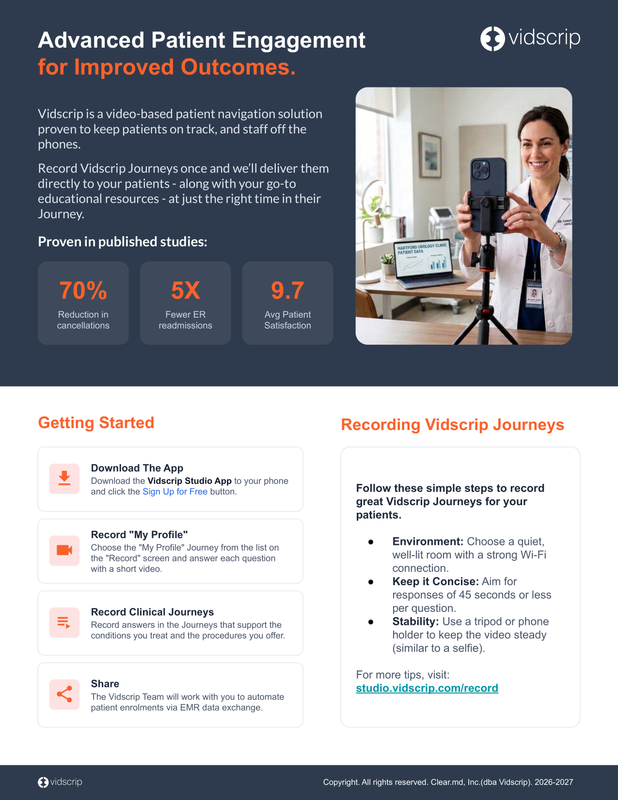
Improve Outcomes with Vidscrip Journeys
Download this one-page reference guide for advanced patient engagement and instructions on recording Vidscrip journeys.
Download Handout (PDF)What Happens on an Intro Call with the Customer?
Watch Vidscrip CEO John Brownlee talk through the Intro Call slide deck.